
Start risk-free
Free
Start free – no risk. Upgrade only when your project grows.
$0
Free forever
AI-Powered WordPress Accessibility
Test your WordPress website for accessibility efficiently, understand WCAG issues faster and improve your site with AI helpers, practical accessibility tools, analytics and reports.
Or test your website right now, for free and in under a minute:
Even small hurdles can make it harder for people to use a website: weak contrast, missing image descriptions, an invisible keyboard focus. This affects people who are blind, have low vision, or have motor impairments.
The shared foundation is WCAG, the international guidelines for accessible web content. They rest on four principles: perceivable, operable, understandable, robust. Accessibility laws in many countries use them as a benchmark.
But websites never stand still: every new image and every plugin update can create new barriers.
Accessibility is not a one-time state, but a process: Check. Understand. Improve. Keep going.
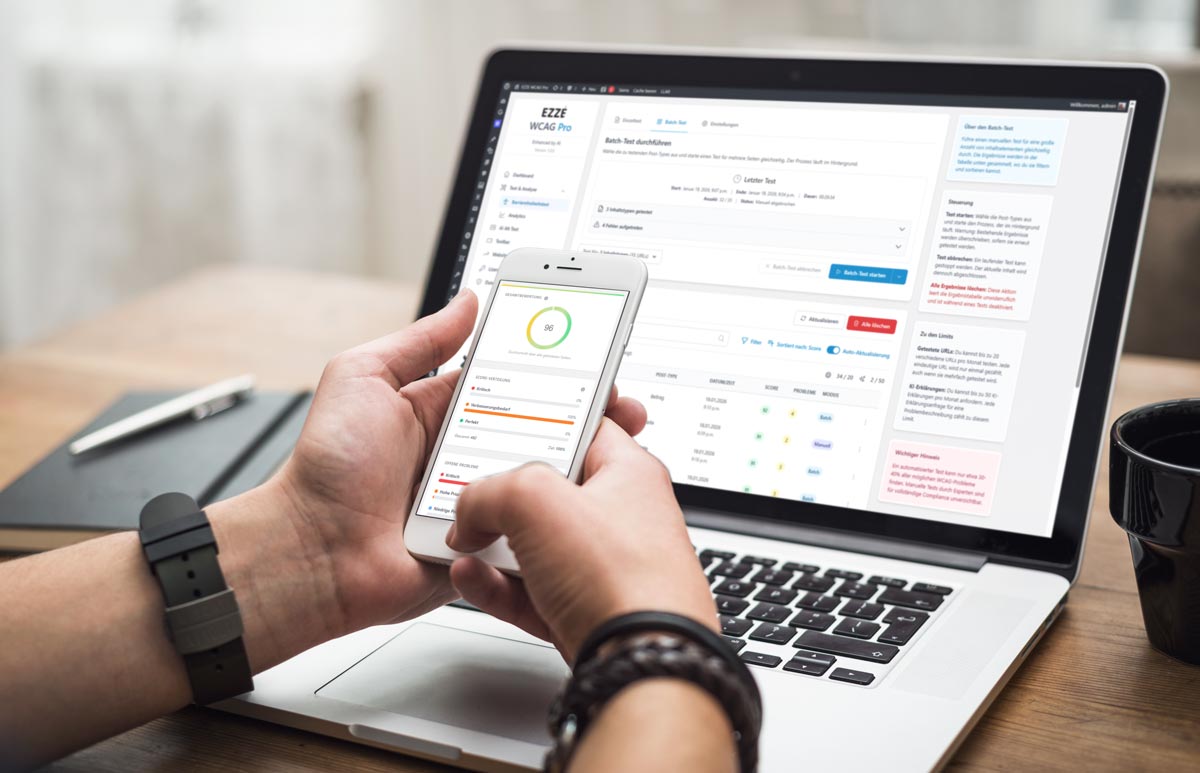
EZZE WCAG Pro makes this process possible right inside WordPress. Start the batch test: many pages, one test run.
You get clear results: a score from zero to one hundred, and all findings sorted by priority.
The Inspector shows you the element, the explanation and the solution. With AI, you even get an element fix as a preview.
If alt text is missing, the AI-assisted alt text feature suggests a description, even for many images at once.
Plus skip links, visible focus, breadcrumbs and keyboard shortcuts.
Your visitors adapt the page with the accessibility toolbar: text size, contrast, colors, reading mode and more.
So you always know where you stand. Start for free today with EZZE WCAG Pro.
How it works
From analysis to implementation: EZZE WCAG Pro helps you detect, understand and fix accessibility issues systematically.
Start an accessibility test right from WordPress and get a structured evaluation.
Get plain-language explanations of WCAG-relevant findings instead of just technical error codes.
Work through the hints step by step, rerun the test and keep track of your progress.
AI-Powered
From automated alt texts to AI-assisted accessibility tests – EZZE WCAG Pro brings real artificial intelligence to WordPress.

Detect, understand and fix errors right away
Generate precise image descriptions automatically

A well-founded WCAG assessment instead of gut feeling
Well-founded recommendations based on your tests
The accessibility check runs in the background — every time you click “Publish”.
Smart AI analysis delivers accessible image descriptions in seconds.
Define who can do what and easily assign features to editors, authors and more.
More than just a test
From scheduled batch tests and image checks to analytics, AI insights and toolbar features — EZZE WCAG Pro extends WordPress with essential accessibility tools.
Test multiple pieces of content manually in one go and keep track of progress
Run regular scans of multiple pieces of content automatically on a schedule
Accessibility tests for the view on mobile devices too
Consent tools are detected and bypassed before a test
Generate alt texts automatically for multiple images one after another
Frontend optimizations for better usability and more accessibility
Plans & Pricing
For freelancers, agencies and companies — one plugin, clear plans, no hidden fees for the core features shown.
Take advantage of our low launch prices!
EZZE WCAG Pro - Analytics
Analytics shows you where things go wrong: common issues, priorities and which URLs or elements are affected — plus score history so you can measure your progress.
Frequently asked
Everything you need to know about features, licensing and privacy. Something missing or need help with setup? Contact our support.
Yes. You can install and try the plugin for free. Depending on the plan, some features are only unlocked in the paid plans. See the Plans & Pricing page for details.
Yes. Upgrades and downgrades are usually handled through your Freemius customer account. After a switch, limits (e.g. tests, AI usage) and features may adjust accordingly.
Subscriptions run through Freemius. You can cancel your subscription there; when the license period ends, the corresponding features and AI quotas expire. The plugin then remains usable with the free features of the Free plan. Invoices and contract details are available in your Freemius account.
For cloud features (e.g. accessibility tests or AI requests), content is transferred to our server and other processing services as required for processing. Exactly what is transmitted is described in the privacy policy.
Yes, in principle: the accessibility test and AI alt text target the delivered pages and media in WordPress. Frontend features (toolbar, skip links, focus outline, …) may conflict with CSS or scripts depending on the theme — in that case, targeted adjustments or theme support will help.
Analytics summarizes all results of your accessibility tests: overview, score distribution, common errors, affected pages and elements, and the history of your score. Included from Premium (Premium and Agency); in Free, Basic and Plus you can still test, but without the analytics feature.
Get started
Test content, optimize images and keep track of your accessibility results right inside WordPress.
EZZE WCAG Pro helps you approach digital accessibility in a more structured way, right inside WordPress. The plugin combines automated accessibility tests, AI-assisted alt text suggestions, clear hints, frontend helpers and evaluations in one central tool. That way you spot typical WCAG issues faster, improve content in a more targeted way and support requirements around digital accessibility, BITV and BFSG.
WordPress websites change constantly: new pages, new images, new plugins, new forms and new content. Barriers that get overlooked in everyday work quickly creep in – for example missing alt texts, weak contrast, unclear link targets, problematic focus styles or elements that are hard to operate.
With the accessibility test from EZZE WCAG Pro you test pages, posts and other URLs right in the WordPress backend. The results show you where typical technical problems occur and which content deserves a closer look. After making changes you can rerun the tests and see more clearly whether your site has improved.
EZZE WCAG Pro does not use AI as blind automation but as practical support in your daily work. With AI Alt Text you can have suggestions for image descriptions generated right inside WordPress, then review, adjust and save them under your control. That saves time maintaining images and helps especially with larger media libraries or websites with many missing alt texts.
EZZE WCAG Pro also helps you with test results: every finding comes with a clear explanation and a way to fix it, and AI Element Fix uses AI to suggest a concrete code fix for individual affected elements. The decision always stays with you, because good accessibility depends on content, context and the specific usage situation.
Accessibility is not a one-time tick on a checklist. Especially for websites with many subpages, regular publications or several editors, repeatable processes are essential. Depending on your active plan, EZZE WCAG Pro helps you test multiple pages or images more efficiently, edit alt texts in bulk, evaluate progress and document results for quality assurance or client projects.
This makes accessibility easier to plan: recurring issues become more visible, improvements are easier to track and important tasks are less likely to slip through in daily work. That is especially helpful for agencies, editorial teams, companies and larger WordPress projects.
Besides testing and evaluation, EZZE WCAG Pro also offers features that act directly on the website. Depending on your settings, these include the accessibility toolbar, skip links, visible focus styles, keyboard helpers, breadcrumbs and hints for links that open new tabs.
These features do not replace a clean technical implementation, but they can give visitors additional orientation and improve usability. The combination of testing in the backend, controlled optimization and supporting helpers on the website is especially effective.
EZZE WCAG Pro is suited to website owners, agencies, editorial teams, companies and project managers who want to make WordPress websites more accessible. You can start for free, try the first features and later switch to a suitable premium plan when you need more quotas, batch workflows, evaluations or agency features.
Automated tests do not replace a full manual accessibility audit. But they help you make typical issues visible faster, make improvements more measurable and integrate accessibility into your WordPress work for the long term.
Start free with EZZE WCAG Pro, test your first WordPress page and decide later whether you want to continue with premium features, batch workflows and evaluations.