
Free
No credit card needed$0
Free forever
- 5 distinct URLs / month
- Unlimited repeats per URL
- No batch test
- No additional mobile viewport
- No scheduled batch runs
- No test after publishing
- Editor integration
- No test result in the toolbar
Batch tests & workflows
Test multiple pages in one run, repeat tests after making changes and automate processes – right inside WordPress.
From manual batch tests and scheduled runs to the automatic test on publish: EZZE WCAG Pro keeps an eye on the accessibility of your entire website – with clear permissions for your team.
Batch feature
Test multiple URLs in one pass, keep track of progress live and find typical barriers faster – instead of testing every page individually.
In the video
From the first batch run to testing after publishing: the video shows choosing content types, the run in the background, filters and batch history, scheduled batch tests, automatic tests after publishing and permissions. With subtitles and transcript.
Lakeview is growing. New rooms, new activities, something on the blog every week. On top of that, editors keep publishing new content. A single test only ever checks one page. With lots of pages and constant changes, you can't keep up that way. And a barrier quickly creeps back in: a new image without alt text, a button with too little contrast. That's why the Accessibility Test in EZZE WCAG Pro has Batch Tests and Automation: scheduled runs and tests after publishing.
In the “Batch test” tab, you open “Test for” and choose the content types: posts and pages, custom post types like rooms and activities, taxonomies like categories and tags, other archives, the front page and other special pages. The scope is estimated in advance, and in brackets you see the number of URLs. Then you click “Start batch test” and confirm.
The test runs in the background. A progress bar shows you how many pages have already been checked. You can close the browser, and the run continues on the server. If it's interrupted, it picks up where it left off. Pages already tested stay untouched. So you don't have to sit and watch.
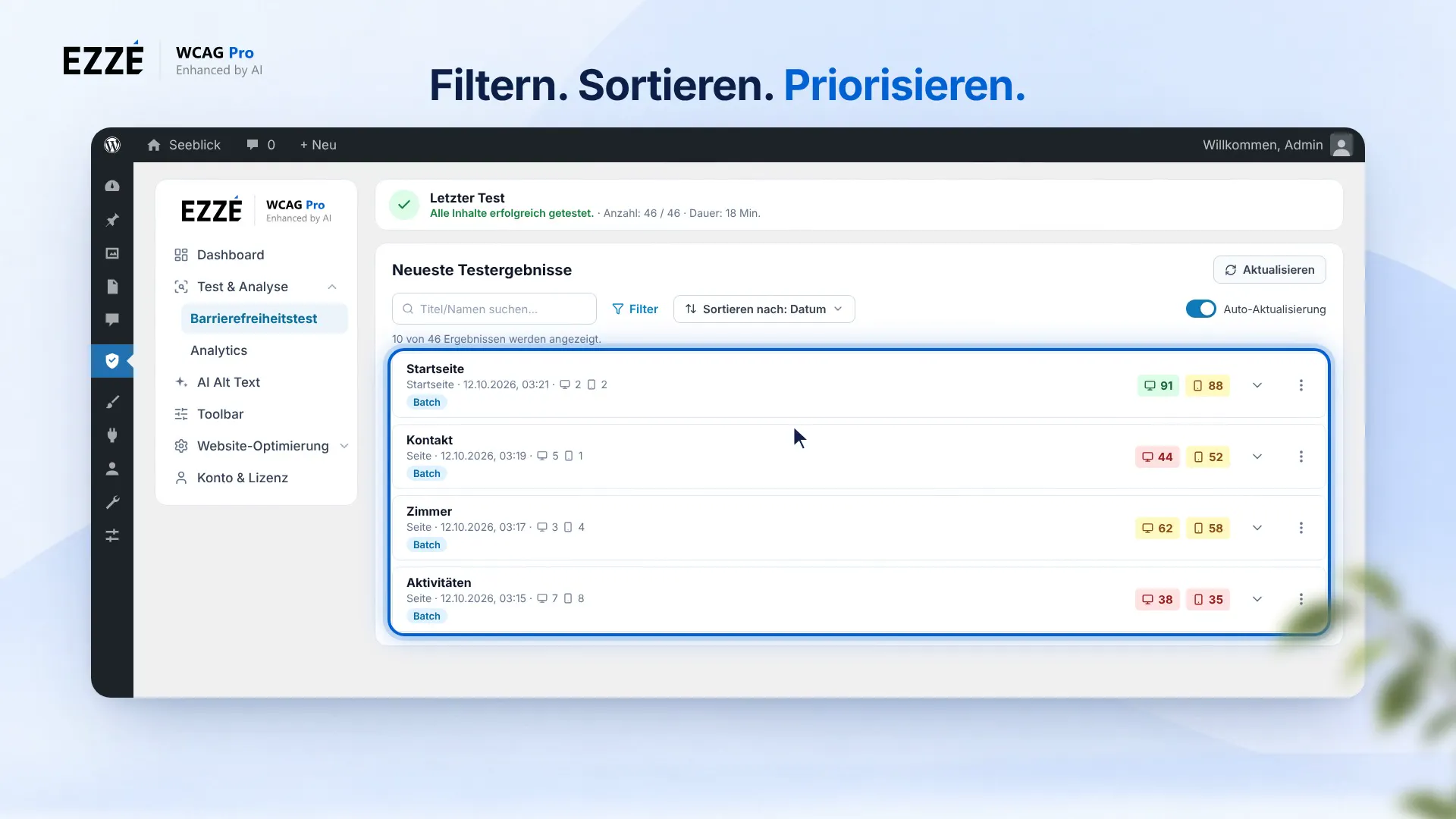
The results appear in a list that you can filter and sort: by content type, score, test age or test source. Active filters appear as chips. Each row shows the desktop and mobile score. That way, you find the pages that need the most work first.
Every run stays traceable. The batch history shows you the status, page count, duration, retries and errors for each run. So you can see at a glance whether everything went through.
Under “Settings”, you turn on “Scheduled Batch Tests”. You choose the content types and the interval: weekly, monthly or custom, every seven to 365 days. You see the next run right in the list. After each run, an email sends you the report.
And when editors publish? Under “Background auto-tests”, you turn on “Test after publishing” and “Test after updating”. Both are off by default. You also decide which user roles trigger the test. An example: an editor publishes a new post about hiking trails. The test starts on its own. Shortly after, the result appears in the “Accessibility” panel of the editor, with score and last check.
Who can do what? Under “Permissions”, you set for each role: allow individual test, allow batch test, test other users' content and delete test results. By default, only the administrator can start the batch test.
Accessibility is not a one-time state. New content, new plugins, new updates: something is always changing. With Batch Tests, scheduled runs and automatic tests, you keep an eye on Lakeview. Here too: automated tests don't find everything. But they keep you on track for the long run. Batch Tests and Automation in EZZE WCAG Pro.
How it works
From selecting content to evaluation: a batch test runs entirely in the background of your WordPress installation – you keep the overview at all times.
Choose post types, archives, taxonomies or special pages like the home page. The plugin immediately shows you how many URLs the run covers.
Before starting, EZZE WCAG Pro estimates the scope and removes duplicate URLs. Up to 10 manual batch starts per day are possible per website.
The run continues via WP-Cron or the Action Scheduler, even if you close the window. Desktop and mobile chips show the status per page.
All results land in a filterable and sortable table. Retest failed pages in one go; the batch history records every run.
Automated tests
Schedule recurring batch tests for your WordPress content and detect new barriers early – without having to start every test run individually.
Have tests run reliably in the background – recurring, plannable and without manual routine work.
Choose your test interval – weekly, monthly or custom between 7 and 365 days.
Optionally receive an email with status, scope and next steps after every manual or scheduled run.
Publishing check
When you publish, EZZE WCAG Pro automatically starts an accessibility check for the new content. Detected issues are displayed clearly so you can rework them manually and precisely. If needed, you can then set the post back to draft status.
The test starts right when the post is published.
Detected issues are displayed clearly and can be fixed precisely.
For relevant issues, you can manually set the post back to draft status.
Team management
Define which WordPress roles may run single tests, start batch tests or delete saved test results. That way every team member gets exactly the permissions they really need.
Assign permissions precisely by role – for example for editors, authors or shop managers.
Keep critical permissions centrally in view and prevent accidental changes within the team.
Workflows for teams
Batch tests, schedules, automatic tests and permissions work hand in hand. Here is how they can be combined depending on your team.
Editors and authors check their own posts with a single test; the test after publishing runs automatically. Batch tests, other users’ content and deleting results stay with the administrator.
A scheduled batch test checks the entire website monthly in the background. The report arrives by email; the batch history with support ID documents every run for clients and team.
After every update of published content, a new test starts automatically. Redirect targets are tested as well, cookie banners are hidden for the cloud test.
All permissions and automations are configurable in the plugin – start restrictive and expand as needed.
Plans & quotas
Batch tests, the additional mobile viewport, scheduled runs and the test after publishing start with Basic. You can see your monthly URL quota right in the plugin.
$0
Free forever
$79.00 / year
equals $6.58 / month
plus applicable taxes
$149.00 / year
equals $12.42 / month
plus applicable taxes
$299.00 / year
equals $24.92 / month
plus applicable taxes
$899.00 / year
equals $74.92 / month
plus applicable taxes
Good to know
Answers on quotas, repeats, redirects, permissions and notifications for batch runs.
Yes. When the same URL is tested again, the saved result of that content page can be replaced by the new state.
This makes sense in order to keep track of the current state of your website. Older test results are then no longer available as a separate state.
Up to 10 manual batch starts per website and calendar day are provided. Scheduled and automatic runs are regulated separately.
If a remaining queue is left after an abort or a server restart, the plugin automatically resumes the run without retesting pages that have already been checked.
No. Desktop and mobile produce separate results but count only once against your monthly quota of distinct URLs.
Each normalized URL counts only once per month – no matter how often you test it. Protocol, host capitalization, a trailing slash or pure tracking parameters do not create a second entry.
By default, redirected entries are skipped without a score. With the option “Test internal redirect targets automatically”, the plugin also tests targets on the same domain; external targets are not requested.
The result is saved only for the final URL. Multiple sources with the same target lead to only one test and consume only one quota.
By default only administrators, because batch tests are resource-intensive. In the permissions you can enable “Allow batch tests” for additional roles with the edit_posts capability, for example editors.
Administrators always keep all four permissions: single tests, batch tests, testing other users’ content and deleting results.
Optionally. After every manual or scheduled batch run, an email can be sent. It distinguishes between completed, failed and aborted and, for limit notices, states the reason, planned scope and next steps.
Get started
Start with a single test in the Free plan and expand to batch tests, schedules and team permissions as your website grows.
With the batch tests from EZZE WCAG Pro you test many pages, posts, archives and taxonomies in a single run. Processing happens in the background of your WordPress installation, progress is visible at all times and all results land in a filterable table with score, viewport and WCAG findings.
Scheduled batch runs test your website on a recurring basis – weekly, monthly or at a custom interval. The test after publishing ensures that new content is checked immediately, and via the permissions you define which roles in your team may start which tests.
This creates a clear workflow for editorial teams, agencies and developers: barriers are not just found once but kept in view continuously – with a focus on WCAG, BITV and BFSG.